Hướng dẫn lấy API Key và API Secret trên Hik-Connect Cloud Teammode
Hướng dẫn từng bước tạo và lấy mã API Key, API Secret trên Hik-Connect Cloud Team Mode để tích hợp dữ liệu thiết bị với phần mềm bên thứ ba an toàn.
Ngày đăng: 21-10-2026
27 lượt xem
- 1. Đăng nhập vào Hik-Connect Cloud Teammode.
- 2. Vào Team Management > Team Configuration > API Integration, mục ThirdParty Partner Account:
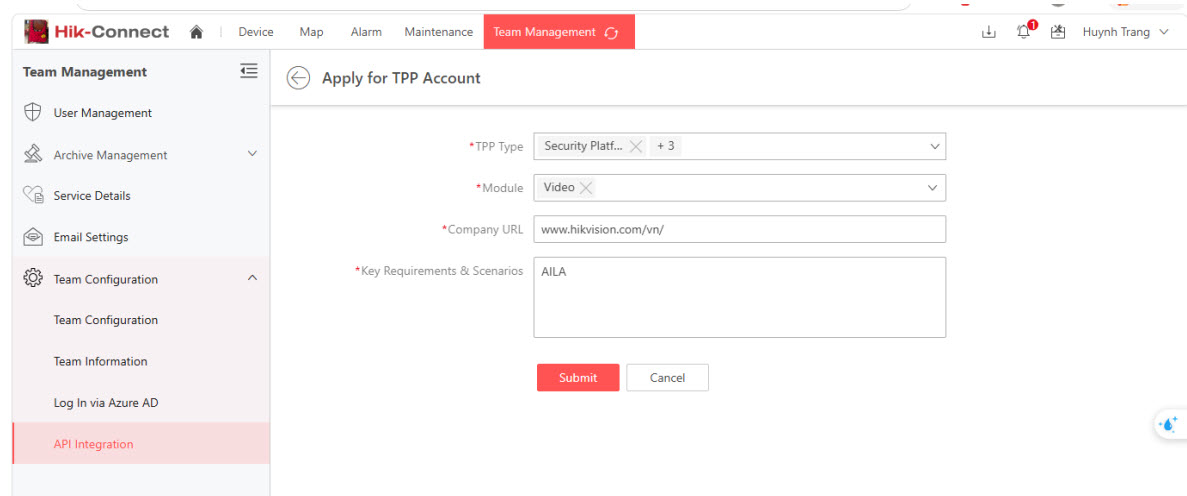
- 3. Điền thông tin TPP Type, Module, Company URL và Key requirements & Scenarios
- 4. Sau khi Submit, mở Team Management > Team Configuration > API Integration > Third-Party Partner Account để xem Account (API Key) và Password (API Secret).
- Account (API Key): tương ứng AK/appKey Password (API Secret): tương ứng SK/secretKey
 08 9898 0626
HIKVISION - CAMERA BÁN CHẠY SỐ 1 THẾ GIỚI
- Địa chỉ: 1190 Phạm Thế Hiển, Phường 5, Quận 8, TP Hồ Chí Minh
- Hotline: 08.9898.0626
- Website: hikvi sionvietnam.net
- Email: [email protected]
-----------------------------------------------------


Tin liên quan
- › Hướng dẫn cấu hình, lập lịch âm thanh cảnh báo trên camera IPC Hikvision
- › Hướng dẫn các hình thức trình chiếu từ máy tính lên màn hình tương tác Hikvision
- › Hướng dẫn sử dụng màn hình tương tác với Wondercast
- › Hướng dẫn họp trực tuyến qua Zoom Meeting trên màn hình tương tác Hikvision
- › Hướng dẫn cài đặt app APK vào màn hình tương tác Hikvision
- › Hướng dẫn truy vấn biển số xe của camera chụp biển số trên iVMS-4200
- › Hướng dẫn xử lí lỗi Error launching Installer khi cài đặt SADP Tool, Batch configuration, iVMS-4200,...
- › Hướng dẫn quản lý bản ghi sự kiện trên các thiết bị máy chấm công Hikvision
- › Hướng dẫn lập kế hoạch xác thực trên máy chấm công Hikvision
Bình luận (0)
HỖ TRỢ TRỰC TUYẾN
-

HIKVISIONVIETNAM
08 9898 0626
SẢN PHẨM BÁN CHẠY


HOTLINE

HOTLINE:
08 9898 0626
ZALO HIKVISION VIET NAM

SẢN PHẨM MỚI



HIKVISION - CAMERA BÁN CHẠY SỐ 1 THẾ GIỚI
 Phân phối và lắp đặt hệ thống camera Hikvision
Phân phối và lắp đặt hệ thống camera Hilook
Phân phối và lắp đặt hệ thống camera Ezviz
Sửa chữa camera, đầu ghi hình Hikvision
Sửa chữa camera, đầu ghi hình Hilook
Sửa chữa camera, đầu ghi hình Ezviz
Chuông hình - Chuông cửa - Máy chấm công Hikvision
THÔNG TIN - CHÍNH SÁCH

LIÊN HỆ
 CÔNG TY TNHH THÀNH CÔNG TRƯỜNG THỊNH
 0313700779
 08 9898 0626


 1190 Phạm Thế Hiển, Phường Chánh Hưng, TP.HCM

Gửi bình luận của bạn